How to Secure a Language Model Beside Your Data on AWS
An AI DevSecOps guide to mapping attack routes, checking what your security tools see, and testing the network rule around a model
What this guide is for
A language model changes the security of an application in three ways. It reads text that outsiders can write, it sits close to private data, and the software that serves it is new, fast-moving and often has no login. This guide shows how to review the environment around such a model and how to host the model so those three facts do less harm. It is written for engineers who run, or are about to run, a model beside application data on AWS. Picture a support lead who pastes an incident report into a model-backed tool. The report holds a customer name and a server address, and the report text was written by a customer. Both facts are why the model needs the same care as the database.
By the end you can map the routes from the internet to your data, rank fixes by route, see what each AWS security tool can and cannot report, add controls that refuse an action, and host a model behind a network rule that you have tested with a test that can fail. Each step gives the reason, the method and the evidence from one review.
A note on status. Some of this is published guidance, and the text names it where it applies (the OWASP list for LLM applications, AWS's public-access settings, Kubernetes Pod Security standards). The rest is judgment drawn from this one review. It shows a way that worked, and it is not a certified best practice.
The system in brief
The reviewed system is a small incident tracker. A user opens a case in a web page, the application stores it, and a button asks a language model for suggested next steps. Five parts matter.
- Application. Two Python pods on Kubernetes (Amazon EKS) behind a load balancer. The main component the internet talks to.
- Database. MongoDB on its own server, with a nightly backup to an S3 bucket. Holds every case, so it is the data to protect.
- Language model. Qwen 2.5 at 1.5 billion parameters, served by Ollama on the cluster's ordinary processors. Reads each case, which is text anyone with access to the application can write.
- Pipelines. Two GitHub Actions workflows, one for infrastructure and one for the application. Whatever they can change, an attacker who reaches them can change.
- Security tools. Inspector, Security Hub, GuardDuty and Access Analyzer. What the defender sees.
The model runs inside the cluster so that case text does not leave it. That choice keeps data private and also puts a new, lightly protected service next to the database, which is the reason steps 6 to 8 exist.
1. Name the data you are protecting
Write down the one thing that must not leak. Here it was the database and its nightly backup. Every later step is measured against that data, and not against the whole account.
2. List the findings, and record where each one comes from
List every configuration finding you can find by looking from an administrator's position and from the internet. Six were recorded here. Each is a few lines of ordinary configuration, and noting the usual origin tells you how to stop the same finding from returning.
- Ubuntu 20.04, outside standard support since 31 May 2025. A server that works is rarely scheduled for replacement. Kernel fixes are available only through an Ubuntu Pro subscription. One unapplied fix, for Copy Fail (CVE-2026-31431), allows an unprivileged local user to become root.
- SSH open to the whole internet. A firewall rule written for one task and not removed. Anyone can attempt to log in at any time, and one stolen key gives a shell.
- A role with AmazonEC2FullAccess on the database server. One managed policy attached in one line, which avoids working out the exact permissions. A shell on the server can act on any server, disk or firewall rule in the account.
- MongoDB 6.0.26. Database versions change slowly, because the database works and an upgrade carries risk. MongoBleed (CVE-2025-14847) discloses server memory before any login. Version 6.0.27 fixes it.
- A public backup bucket. Two of the four public-access guard settings are off, and one policy admits all principals. Anyone can list the bucket and download the nightly backup.
- An application running as cluster administrator. The binding is short and works on first use. One compromised pod holds every secret and workload in the cluster.
Copy Fail has been present in the Linux kernel since version 4.14 (2017) and was assigned a CVE identifier in April 2026. For more than eight years every server running an affected kernel carried the flaw. An old finding is not a harmless one.
3. Map the routes to the data, then order the fixes
A list of findings is an inventory. To decide what to fix first, draw every route from the internet to the data you named in step 1. Three were found, and the method is the same on any system. Start at the internet, follow each exposed component inward, and stop at the data.
The first route is a shortcut that needs no skill. The backup bucket is public, and the newest backup holds every case together with the stored password hashes of the database users. Check your own buckets the same way, with a request that carries no credentials. This returns the status only and downloads nothing.
curl -s -o /dev/null -w "%{http_code}\n" "https://YOUR-BUCKET.s3.amazonaws.com/?list-type=2"
A 200 means the bucket lists to anyone, and a 403 means it does not. The same request was sent to two buckets in the account.
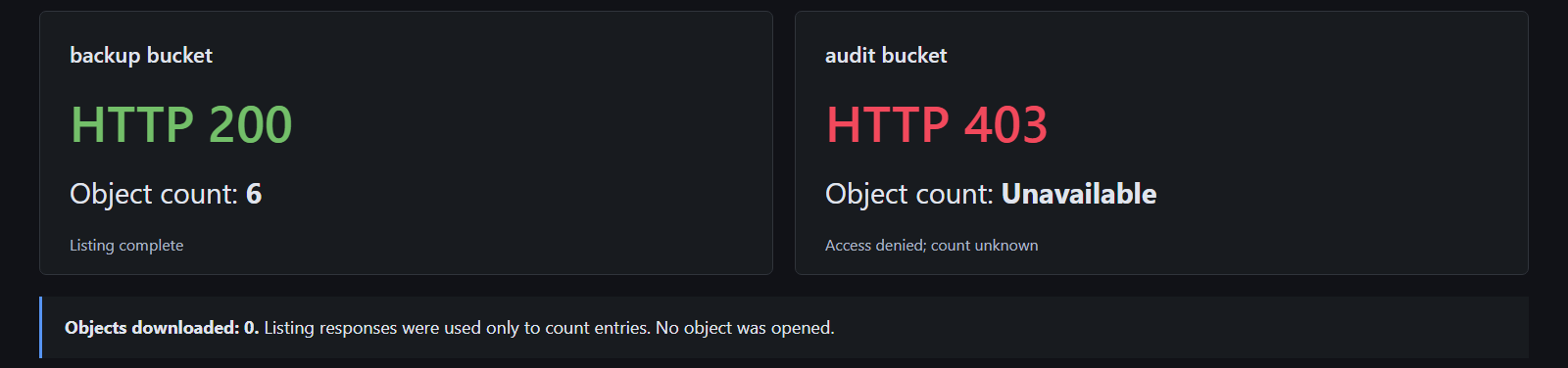 Anonymous listing request sent to two buckets on day five. The backup bucket answers 200 and lists 6 objects. The audit bucket answers 403. Only the status and the object count were recorded, and nothing was downloaded.
The second route is a chain. SSH is open to the internet, so one stolen key gives a shell. The operating system is outside support and its kernel carries Copy Fail, so the shell can become root. The database and its admin password reside on that server, and the server's role can act on any server, disk or firewall rule in the account. The final step was inferred from the permissions and was not attempted.
The third route starts at the front door. The application is the main component the internet reaches. It holds the database login and runs as cluster administrator, so its compromise exposes every secret and workload in the cluster. MongoBleed can be reached from the application and from any pod except the model.
All three routes end at the same data, so closing one route does not protect it. Order the fixes with two questions. How easy is the target to reach, and what does the attacker obtain?
- First, make the bucket private, treat the backups as taken, and rotate both database passwords. Anyone can reach it with no skill, and it holds every record and the password hashes.
- Second, close SSH and remove the role's extra permissions. Session Manager (AWS's way to open a shell on a server with no open port) already reaches the server, so closing port 22 loses no access. Together with the first fix, this closes the shortcut and the chain.
- Third, take cluster administrator away from the application. It is one binding, and the application is the component the internet touches.
- Fourth, turn off network compression now, then upgrade MongoDB and the operating system in a maintenance window. MongoBleed needs a foothold inside the cluster first.
Ordered by severity, the kernel findings rank first. Ordered by route, the bucket ranks first. This ordering is judgment from one review, and published severity ratings remain a valid input.
4. Check what your security tools can see
Turn on the AWS tools that report on the environment and then read what each one says about the data from step 1. The account here ran Amazon Inspector (vulnerability scanning) and the newer Security Hub (a consolidated view of findings), with GuardDuty (threat detection) and IAM Access Analyzer (public and cross-account access) also enabled. Readings were taken on day three of the review.
- Inspector reported 4,475 findings on the server, 4,064 of them in the kernel package, port 22 reachable from the internet, and Copy Fail rated High with an exploit available. It did not observe the database. No finding mentioned MongoDB, so MongoBleed was not reported on a server running a vulnerable version.
- GuardDuty reported two SSH brute-force findings against the server, rated Low. It did not observe the application's cluster administrator rights. Its documented finding for administrator rights covers the default service account, and this application uses a named one.
- Security Hub reported one Critical exposure on the server, joining internet reachability, vulnerable software and high-priority vulnerabilities, with a related GuardDuty finding and a role with a service admin policy shown as context. It did not observe the data. It rated the server Medium criticality and did not mention MongoDB or the bucket.
- Access Analyzer reported the public backup bucket as a finding of its own. It did not observe any link between the bucket and the server.
Write your own version of this list for your system. The part each tool did not observe is the useful part, because it lists the checks you must do by hand. Two lessons came from it.
First, counts differ between tools. On day two the pipeline's scanner listed 47 High rows for the application image, which reduce to 11 distinct flaws, and Inspector listed 2 High. The tools count different things from different data, so treat a count as one input to a risk judgment.
Second, detection begins when you enable it. The audit trail recorded the following sequence on day one, in UTC.
- 07:02. The backup bucket becomes public.
- 07:30:48. Access Analyzer is enabled.
- 07:30:58. The analyzer flags the bucket.
- 07:36. Security Hub reports a Critical exposure on the server.
The bucket was public for about twenty-eight minutes before any of these tools was checking for public buckets. Enable detection before the first deployment, and enable object-level logging on any bucket that holds backups. Here no record exists of who read the bucket, because the audit trail covers management events and not object reads. Whether the backup was downloaded cannot be determined, and the safe assumption is that it was.
5. Add controls that refuse, before controls that report
A preventive control stops an action. A detective control reports it afterward. Add the preventive ones first. Several are documented AWS and Kubernetes controls that are on by default or take one setting.
Keep all four public-access guard settings on for every bucket. A second bucket in the account kept them on. A public policy applied to it by an administrator was refused with AccessDenied on PutBucketPolicy. The same policy had been accepted by the backup bucket, where two settings were off.
Enforce the Kubernetes Pod Security standard named restricted on the application's namespace. A privileged pod was refused. The reasons listed included that it was privileged, that it allowed privilege escalation, that it retained all its capabilities and that it could run as root.
Build the delivery pipelines on the same principle. Run every check on pull requests with no AWS access. Start deployments only by hand from the main branch, under a short-lived identity that AWS accepts only for that repository and branch, so no AWS key is stored in GitHub. Add a guard that reads each Terraform plan, the preview of an infrastructure change, and stops the run on any delete or replacement. Let secret scans stop the pipeline, and block on Critical vulnerabilities that have a fix available. Vulnerability scans that only report are easy to ignore.
Expect a cost from narrow permissions. A pipeline role that could create an audit trail but could not read trails back failed partway, and two read-only permissions fixed it.
6. Host the language model as a workload with a supply chain
The application had one feature that used a model, a button that suggests next steps for a case. The model, Qwen 2.5 at 1.5 billion parameters served by Ollama (a model server), ran on the cluster's ordinary processors. It ran locally so that case text did not leave the cluster, and it was small because it had to fit on two cores.
Local hosting describes where a model runs and does not establish that it is safe. Ollama's API has no login. That is acceptable while it listens only on the machine, and a container usually must listen on every address inside its pod, which makes the API reachable from anything the network admits. Treat a model pod like any workload and ask four questions of it. These are the standard supply-chain, network and privilege questions, applied to a model. Each had a concrete answer here.
- Where did it come from? The base image and the model are pinned by digest. Every model file is re-hashed against a lock file at build time, and one changed byte stops the build. (OWASP LLM03 Supply chain)
- What does it receive? Five fields of one case. No password, no key, no database address. (OWASP LLM02 Sensitive information disclosure)
- Where can it connect? Only the application can reach it, on one port. All outbound traffic is denied, including DNS and the cloud metadata address. (not mapped to the OWASP list)
- What can it do? Nothing on its own. An ordinary user, no cloud keys, no cluster token, no tools and a read-only root disk. (OWASP LLM06 Excessive agency)
Simon Willison's "lethal trifecta" (June 2025) gives a second check. An AI system is exposed to data theft when it can read private data, can read content an outsider can write, and can send data out. Remove any one of the three and that attack is gone. Here the model read a case, which is private, and a case is text that anyone with access to the application can write. The network rule removed the third property. For the same reason prompt injection (LLM01) had little to act on, because the model had no tools, no credentials and no network.
Avoid the unsafe version, which has a floating image tag, runs as root, mounts the cluster token, opens its port without a login, has no outbound rule, pulls its model at startup and skips the integrity check. Such a pod would be expected to function normally, and none of these flaws would be visible in normal use.
Plan for the case the fingerprint check does not cover, a hostile Python package beside a sound model file, because the check applies only to the model files. The hardened pod contains no Python, and for any bad code that did run, the network rule denies outbound traffic once it applies. The rule is the control that holds when an earlier control has failed.
7. Test the network rule with a test that can fail
Test the rule with real connections. Here there were seven. Three had to succeed, namely the application reaching the model and a probe pod reaching the application and the internet. Four had to fail, namely the probe reaching the model, and the model reaching the application, the internet and the metadata address. Include the expected successes, because a timeout has no meaning when the target was never reachable. The metadata address is on the list for a documented reason. In 2019 an attacker used a flaw in a web application firewall at Capital One to make a server query the AWS metadata service, took the role's temporary credentials, and read data on about 100 million customers.
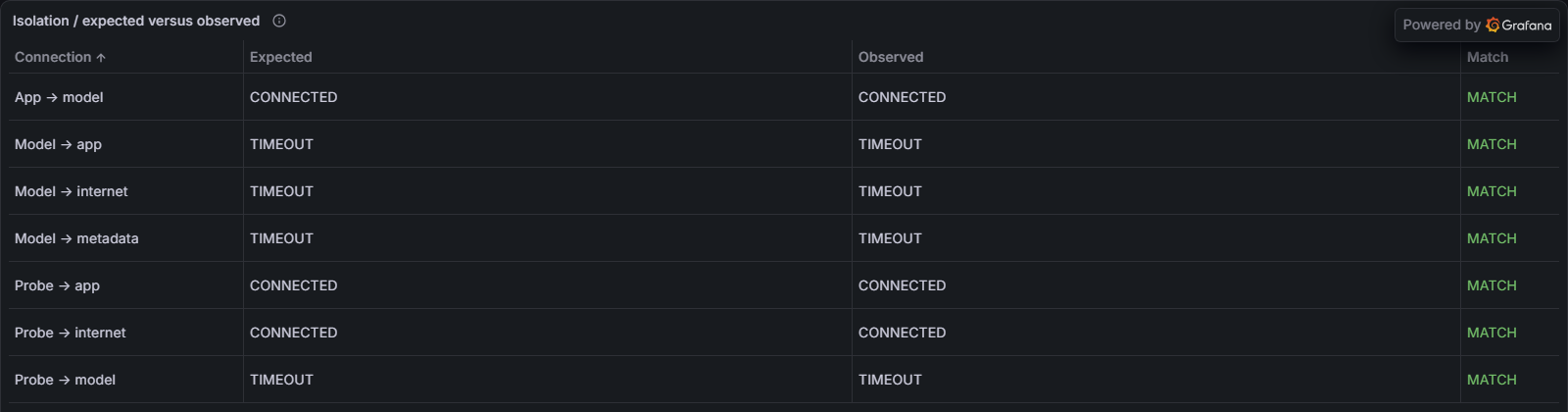 Seven connections, expected against observed, on day five. Three connect and four time out, and all seven match.
Make sure the test can fail. A script that prints the observed result beside the expected one and never compares them passes even when every connection succeeds. Write the script so that each attempt gets one of four results (connected, timed out, refused, error), each is compared with its expectation, the three controls run first, and any mismatch exits 1.
Record the limits of the rule. A new pod has about one second before its rule applies, and a stricter enforcement mode closes that window at the cost of requiring a rule for every pod before it can start. Then check who can delete the rule. The application here runs as cluster administrator and can therefore delete it, which you can confirm with permission checks that attempt nothing.
kubectl auth can-i delete networkpolicies -n YOUR-NAMESPACE --as=system:serviceaccount:YOUR-NAMESPACE:YOUR-APP
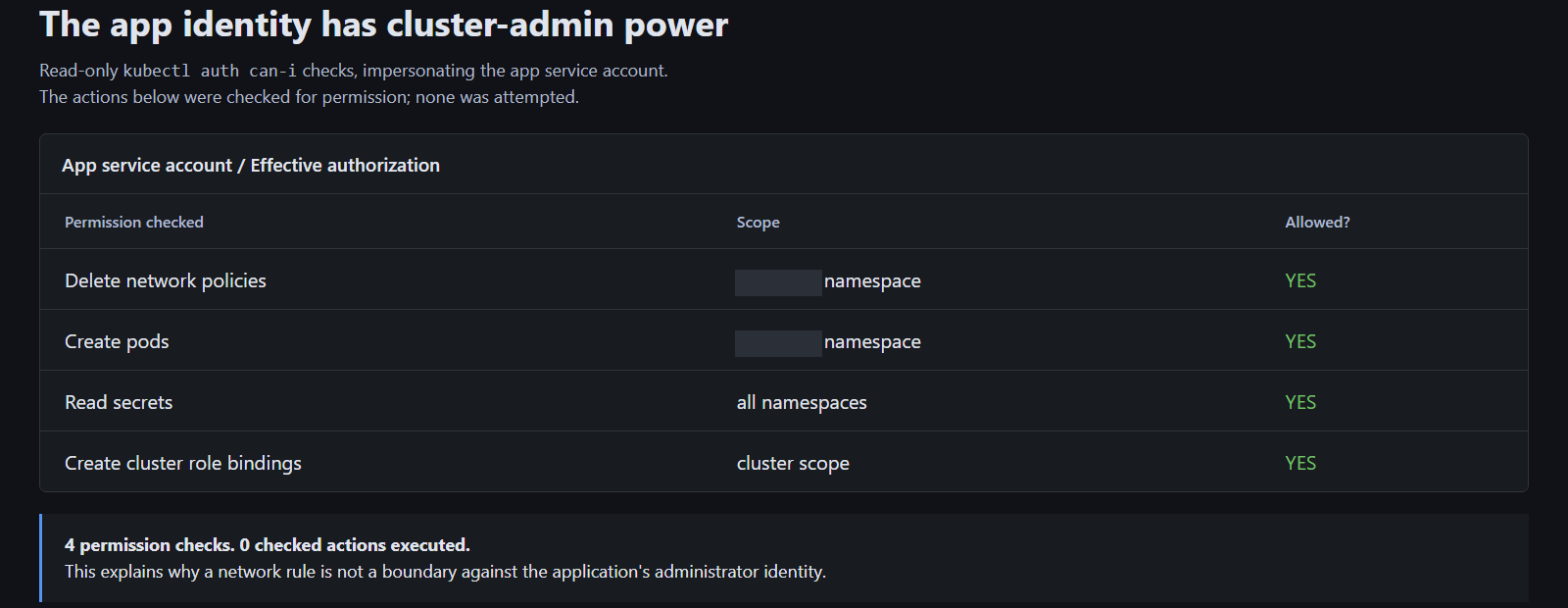 Permission checks for the application identity, on day five. Deleting network policies, creating pods, reading secrets in every namespace and creating cluster role bindings are all allowed. None of the actions was attempted.
A network rule stops an ordinary workload and does not stop an administrator. The safety of the model therefore depends on the sixth finding in section 2.
8. Plan for wrong answers and for cost
Controls limit what a wrong answer can reach. They do not make the answer correct. In one test case the evidence stated that database CPU was normal, and the model advised checking database CPU. Direct the advice to a person and to no other system.
Measure capacity as well. A model with no per-token cost still consumes processor time, and anyone who can reach it can spend that time. Four requests took between 9 and 26 seconds each and raised the pod to a smoothed peak of 1.27 of its 2 cores, with memory settling at 1.12 GiB. The pod answers one request at a time, so further requests queue, and nothing in the pod limits the rate at which they arrive. Only the application can reach the model, and the application's advice route requires an access key, so those two controls decide who can queue.
 CPU and memory for the model pod (yellow) and the application (green) during four requests on day five. The model pod is the only line that moves.
Scan the model image too. This one carried 3 High findings in Amazon Inspector. They sit behind the same rule, which gives them nowhere to send data.
The review used a small model, and the controls above do not depend on its size. A model of 600 billion parameters would change the sizing and leave the four questions the same. Its weights run to hundreds of gigabytes even at 8-bit precision, so it would need GPU nodes, and the supply-chain question grows with the download, because the digest check covers more files and the build pulls more data. Each request costs more and holds the pod longer, so the access key and the rate limit matter more. The network rule, the identity and the input limits apply unchanged. These points are reasoning about a larger model, and they were not measured in this review.
9. Limits of this guide
The Kubernetes API endpoint in the reviewed environment was public and guarded by AWS identity, because the pipelines had to reach it. A private GitHub repository requires a paid plan for branch protection, so the rule that deployments come only from the main branch resided in the workflow and its scripts. The application answered over plain HTTP.
Whether anyone downloaded the backup cannot be determined. Object-level logging on that bucket would let a later review answer the question. Figures were recorded on days three and five of the review, and scanner counts change daily.
Checklist
- Name the one dataset that must not leak.
- List every finding, then draw the routes from the internet to that data.
- Fix by route, and rotate secrets for anything that was public.
- Write down what each security tool cannot see, and cover that by hand.
- Enable detection and object-level logging before the first deployment.
- Prefer controls that refuse over controls that report.
- Give a model pod a pinned image, a verified model, no outbound traffic and no cloud credentials.
- Test its network rule with seven connections or more, and make the test able to fail.
- Send model output to a person, and watch its processor use.